Android phones are becoming more and more advance these days, and are used for more reasons than one. Whenever you buy an OPPO smartphone, you are always guaranteed to get the best specs and features and that too under your budget.

Android phones are becoming more and more advance these days, and are used for more reasons than one. Whenever you buy an OPPO smartphone, you are always guaranteed to get the best specs and features and that too under your budget.
Philips monitors bring a lot on the plate with premium looking screens, slate-clean designs, and ample specs. But the Philips B-Line monitors create a distinct stance with their new features. The advanced functionality like Wireless connectivity and built-in Chromecast in these Philips monitors make them excellent. From most of the computer monitors, the monitors from the Philips B-Line stand out. This is mainly because Philips has provided its B-Line series monitors a huddled build and upgraded technology.
Since the past 10 years, smartphone charging was one of the biggest problems that manufacturers were facing. This problem is becoming more evident since the time we've entered in 5G era. To address this problem, Oppo officially announced the superfast-charging technology with 30W Vooc super flash charging. This USB Type-A based charger supports Oppo's brands on Vooc Flash Charge 4.0 charging system for up to 30 watts (5-volts @ 6-amps) output. Let us review why Oppo's 30W Voocadopter is a must-buy charger for your Vooc supported phone.
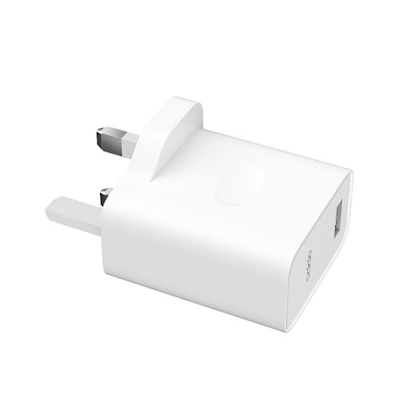
30W VOOC- The Ultimate Charging Experience
Oppo has announced its 30W VOOC flash charger and VOOV 4.0 Flash charge technologies together. First introduced in 2014, the charger was introduced to ensure that you never go out of power. Here are some specifications of the 30W VOOC charging adapter.
Specification
The 30W Vooc flash charger fuels up to 67 per cent of a
4000mAh battery in 30 minutes and 100 per cent in just 75 minutes. In contrast,
the other brand's power bricks give only half-charging in the meantime. A major
technical highlight of Super Vooc is the use of two powerful technologies
together. The "Dual Cells" and rear-stage "ChargePump"
stops the extra discharge of power from the battery. This
"ChargePump" act as a step-down chip to control the entire discharge.
For better charging and environment safety, Oppo charging units comes with safety and protections standards like Overcharge Protections, Overvoltage Protection, Overpower Protection, Temperature Protection, Short-circuit Protection, Over-current Protection, and a few other. This 10-fold protection will enhance lithium-ion batteries charging cycles and retain their power storing capacities.
Charging Power
Oppo claims that the 30W Vooc flash charge technology allows a 4000mAh battery to reach a full charge within 75-80 minutes. The charger is compatible with the QI Standards and supports a charging power of 5W or 10W. The 30W Vooc flash charger uses real-time power adjustments to ensure efficiency and safer charging without overheating. The improvised sensory enhancements are made to ensure foreign object detections while charging and also provides overheating.
Newest features
Oppo is always busy in enhancing user experience. The 30W Vooc charging technology is not only meant for Oppo customers but even for external partners too. The 30W Vooc charger comes with real-time adjustments to make the charging process more efficient. The sensory functions are also added to avoid unwanted disruption during the charge.
Oppo technology successfully reduces the internal resistance during charge through an efficient and advanced battery cell design. You can use the smartphone while charging without worrying about the phone's temperature.
Verdict
The Oppo 30W Vooc Charging adapter is more than ok. The
device works perfectly well with Oppo and a few other devices also. Indeed, it
can charge the whole battery in half-time, compared to the regular charger. You
can visit the Official Oppo store for
30W Vooc Charging Adapter.
Lenovo Desktop PCs pack real value inside their modest chassis and are best choices for homes and offices. These PCs have won the hearts of millions owing to their consistent performance that comes with affordable price tags. This is the reason why Lenovo is a household name whether it is about Core i3 Desktop PCs or Core i7 Desktop PCs.

Lenovo
Desktop PCs are dominating the market when it comes to business-oriented
computers. Especially, the Lenovo ThinkCentre series takes the lead in this category and
provides the best possible specs. The Lenovo ThinkCentre M90n is a relatively
new addition to this line with the same quality hardware.
The M90 is a
compact Lenovo ThinkCentre desktop PC which is ideal for offices with small
space. Lenovo has done impressive work to pack such firepower inside a nano
desktop PC without compromising over performance or speed. The best thing is
that you can get Lenovo ThinkCentre M90n in Core i3, Core i5 and/or Core i7
processor.
However, in this review, we are going to discuss the best use case scenarios for Lenovo ThinkCentre M90n Core i3 and Lenovo ThinkCentre M90n Core i7 versions.
Lenovo ThinkCentre M90n-1: Core i3 Desktop PC
Core i3
desktop PCs are an integral part of Lenovo Desktop PCs as they cater to the
computing needs of a wider audience. From homeowners to small business users
and students, they help users with everyday computing tasks. This is the reason
why Lenovo ThinkCentre has a dedicated line of Core i3 Desktop PCs.
The Core i3
version of Lenovo ThinkCentre M90n has got more than enough power. This is a
small powerhouse that could carry out day to day tasks.
If you look
at the specs, you will find it to be a mini workstation. The inclusion of 8th
generation i3-8145U along with 256GB SSD storage and 8GB RAM puts it among the
high-end Core i3 Lenovo Desktop PCs.
Lenovo
ThinkCentre M90n (Core i3): best use case scenarios
The
quad-core processor can deliver a maximum clock speed up to 3.9GHz, which is
enough if you are to run heavy apps. This is a great choice for both business
managers and students as well as home users. Being a small computer from the
range of Lenovo Core i3 Desktop PCs that you could easily hide behind the
monitor.
The Core i3
version of Lenovo ThinkCentre M90n has got the muscle to run light to mid-range
tasks. Thanks to an 8GB memory, you could easily accomplish all work or
office-related tasks. You can run the whole Office Suite, up to a dozen Chrome
tabs and do light media editing (images).
In a nutshell, the core i3 version matches the old Core i5 desktop PCs in terms of performance. You can fully uncap its powers whenever needed and will not face overheating or noise issues. The ThinkCentre M90n (Core i3) can be used for basic media-streaming and office tasks, such as data entry, word processing, and social media marketing.
Lenovo ThinkCentre M90n: Core i7 Desktop PC
Core i7
Desktop PCs are known for hyper-threading, max turbo boost and extraordinary
performance under pressure. Lenovo Desktop PCs with Core i7 CPUs are the best
when it comes to multitasking with efficiency. And Core i7 version of Lenovo
ThinkCentre M90n is no different from other Core i7 Lenovo Desktop PCs.
The hardware
selection on the Lenovo ThinkCentre M90n Core i7 version is formidable. It
comes with the 8th generation i7-8665U processor along with a fast 16GB memory
and solid-state storage of 512GB.
Lenovo
ThinkCentre M90n (Core i7): best use case scenarios
The
quad-core i7 processor offers a base speed of 1.9GHz and could deliver a
maximum clock speed of 4.8GHz. The overall performance of this CPU depends on
the TDP limits and cooling system. Since Lenovo ThinkCentre M90n is a nano
desktop PC, it contains a tiny cooling fan. The consistent spinning of the
cooling system makes it an ideal CPU to run designing programs, heavy software,
and light gaming.
The hardware
combination on the Core i7 ThinkCentre M90n makes it a high-end pick from the
Lenovo Desktop PCs. It has got enough firepower to handle the heaviest tasks
that you would throw at it. Plus, the 16GB RAM provides enough space for
multitasking that you won’t feel left out by the Lenovo ThinkCentre M90n.
Lenovo
ThinkCentre M90n (Core i7) looks like an external hard drive but carries the
power like the mighty tower PCs. A Core i7 CPU, max turbo boost of
4.8GHz, and Hyper-Threading promise a powerful performance without any lags.
Moreover, the Windows 10 Pro operating system provides extra security features
to ensure your data.
On the other
hand, you can easily take your system from office to home and vice versa. The
small size of the ThinkCentre M90n makes it possible for you to carry it around
in your pocket. With a weight around 1.1lbs (0.5kg) and dimensions about 7.05 x
3.46 x 0.87 inches, this is among the smallest Core i7 desktop PCs.
Conclusion
A blasting gaming experience is all you need when you invest a considerable amount of budget in your laptop. The ASUS ZenBook UX330UA is one of those high-end laptops that pack incredibly powerful features in its mainframe. To say it’s a deal breaker might be a crucial statement but here we are today to dig in some real facts.

Primarily, the ASUS ZenBook UX330UA is known solitarily as
an excellent gaming laptop, but it takes it functionality far beyond than that.
Every laptop has its reason of buying, but some of the laptops need the reasons
to be stronger enough to buy them, and ASUS ZenBook UX330UA is one of those
expensive laptops. This ASUS Zenbook demands a big hole in your pocket, so
before buying it you should know the real reasons you are purchasing it.
Before we proceed towards our top 5 reasons of buying the ASUS
ZenBook UX330UA, you should know that this firehouse comes with a classic
laptop design and a relatively bulky build. So, just be ready to experience a
heavy power beast coming your way if you decide to get your hands on this one.
Specs List
Dual-Screen Setup with OLED display
If there must
be one thing that could not be ignored in the ASUS ZenBook UX330UA, it will be
the OLED display that the main screen exhibits. The cherry on top here is the
secondary screen panel provided as ScreenPad Plus which can be used for various
activities.
The main
screen of 13.3 -inch includes the
touchscreen functionality as well along with the Ultra 4K HD Resolution.
Getting on-point visuals through this screen is not anything that is even 1%
impossible, because with this screen you can even work on Hollywood level media
projects. This ASUS ZenBook UX330UA can be labelled as a solid photo-editing
powerhouse. The OLED displays are useful for showcasing wide range of colors on
the screen as compared to the LCD panels. The contrast ratio of the screen is
also superb along with the maximum brightness that is amazing in the sunlight
too.
The
secondary screen is of 13 inches has matte textured finish with 3200 x 1800 and an LCD panel. It can be used for using any kind of
applications without the limitations regardless of whatever you are running on
the main screen. This screen is obviously not the same quality as of the main
screen but comes in great use when you are busy with main screen and need
extensive multitasking. It can be used as touchscreen and has stylus along it
which could be used for quick click switches.
Core i7 Excellence
What is the
most powerful processor you have heard of? Probably not any other than the
Intel core i7 itself. In fact, the core i7 is used vastly in the incredibly
high-end or luxury laptops, and core i7 is even the advanced form of it. So,
you can clearly imagine the power it holds in any sort. This ASUS laptop
features Intel Core i7, and it flies with the maximum
turbo speed of 2.7 GHz (3.5 GHz).
If you are
not just entirely sure about the core i7 spec perfection, it performs
extra-ordinary in real-life implementation as well. It competes with the Apple
Macbook without any second doubt and rocks in every gaming, heavy-voltage, or
technical application. It is basically an octa-core processor with ultra-fast
processing and boosts the overall performance of this laptop.
Either if
you are a pro gamer or a technical professional who needs a laptop for
incredibly heavy-voltage usage, the ASUS ZenBook UX330UA just stands like a
solid laptop for every task. You can also expect from this laptop to
overperform in many aspects such as loading, downloading, and executing several
intensity files.
2.
Dedicated Graphics
If you are not familiar with RTX 2060, it is NVIDIA’s most intense GPU system setting that is used for rigorous gaming. It is a deal breaker when it comes to editing over-the-edge media files, playing pro-level games, or working on high-level graphic projects. With its expensive price, the ASUS Zenbook Pro Duo makes it worth it with the Integrated Intel HD 620 Graphics. This graphic card insertion makes gaming experience unlike any other and takes you from your desk to the real gaming scenario. You will be able to witness extremely high-level visuals, crisp and clear graphics and the 4k screen supports it giving a perfectionist vibe.
3.
Best RAM & SSD Combo
If you did
not hear about 8GB RAM, 512GB SSD in any of the luxury laptops, this one
consists of a massive memory that copes brilliantly with the 1TB storage. This rock-solid
combo can turn down any machine in comparison when you try running intensely
heavy files or programs.
This
pairing makes multitasking easier to the level that you will not probably feel
any heavy work with a burden. It makes switching between unlimited files and
programs relatively convenient while you can also play high-graphical videos on
the side. The 1TB PCI slot with solid-state storage makes heavy file management
seem like a left-hand job, which could be just taken lightly with ASUS ZenBook
UX330UA.
4.
Great Build Quality
ASUS has left no compromise in building the ASUS ZenBook UX330UA with its heavier model and aluminum body. The look of it is sleeker and you would not imagine of it being that heavy, but it is rather on a bit heavy side. You can still carry it around anywhere without much of a burden. The number of ports included in this ZenBook are also large enough to provide extensive connectivity options. You also get a Thunderbolt C port which is highly unusual in many of the laptops. The build is made of very high-quality and withstands knocks and bumps quite easily without any worry of damage.
Get an Offer on ASUS ZenBook UX330UA
Thinking of
buying ASUS ZenBook UX330UA and need financing options? Guess what, the Laptop Outlet UK Store is offering. This will make it much easier for any of you who really need
to get this laptop in their hands in no time. The Laptop Outlet provides special
students discounts and finance options on all ASUS laptops. You can also view
reviews of customers and get yourself satisfied with any laptop purchase.
Professionals often search the ‘best Ultrabook 2020’ and this is because when it comes to portable laptops, getting an Ultrabook is the best choice. However, the line between quality laptops and best Ultrabooks is very thin, and the difference is unclear to many. You need a keen eye to distinguish an Ultrabook and in case you cannot we are here to help you.
RTX 2080 Gaming Laptops are leading today’s gaming market, thanks to their AI-injected Tensor cores. These are the most powerful models among RTX Gaming Laptops that you could find on the market today. Of course, their prices are on the high-end, which might be a problem for those on a budget. But if you are not worried about breaking the bank, you would want one for yourself.
