Wednesday, 15 April 2015

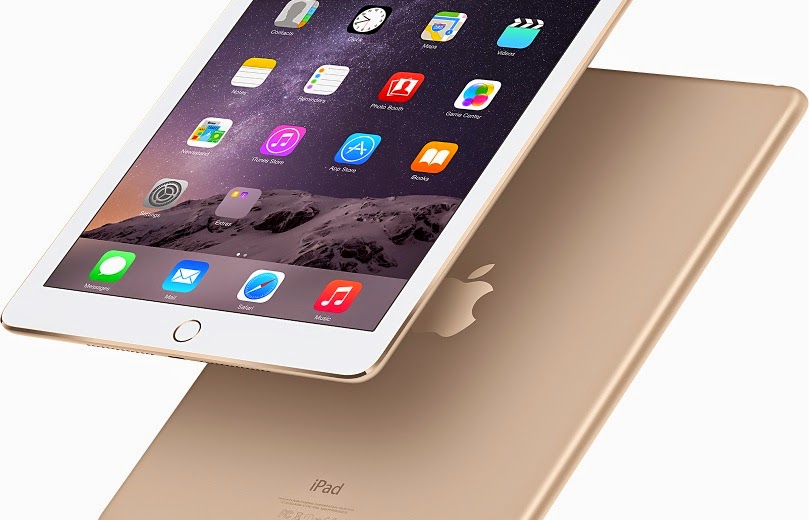
iPad Air 2 Review


Though iPad Air’s first version was also the head turner but the latest iPad Air 2 has actually stirred the tab market. Apple iPad 2 will surely satisfy all those who were anxiously waiting for its launched by keeping their hopes high. If you own a two to three year old iPad then this iPad Air 2 will definitely look extremely modified to you. From weight to storage to overall performance iPad Air 2 is simply amazing in every sense. 

Design

Measuring just 6.1 mm it is one of the thinnest tablets you can find. Despite being exceptionally slim and light it is strong in built and easy to hold. Being ultra-light it just weighs 437g which means no more wrist aches after holding tablet for long time. It may not be world’s slimmest and thinnest tablet but it definitely gives you best performance in this size as compared to other tablets. With modern feel and premium design it easily justifies its expensive price tag. The overall design resembles a lot to iPad Air that you may find difficult to differentiate between both the models.

iPad Air 2 does not come with the silencing switch, the switch has been omitted to reduce the size however Apple argues that this function can be easily performed in OS just by the flick of hand. But if you are one of those who like to handle the sound without even looking at the screen you’ll definitely going to miss this button. Another major change is the touch idea on home key and the speaker grill has also changed its position now it’s at the bottom with single line of holes.

Display

iPad Air 2 shares identical display as of iPad Air. It is also featured with a 9.7inch screen across the diagonal with Retina resolution of 1,536 x 2,048 and pixel density of 264ppi. It is excellent in colour accuracy with average Delta E of 1.82, and the screen is capable of covering 93.3% of the sRGB gamut. The fully laminated LCD also makes pictures and images look more real and life like.

Touch ID

Tocuh ID and Apple Pay are the noteworthy improvements in the latest version. With Apple Touch ID your tablet remains secure more than ever. When this feature is widely implemented it will also enable you to pay on the move without using your credit card. It is further rumored that Apple will also make it applicable for apps. Imagine how cool it will be if your mail checking app or other such apps will be opened after confirming the identity.

Camera

Bringing iPad on every special event for taking pictures has become a common trend. To keep up with this trend Apple has equipped iPad Air 2 with 8MP iSight camera. Featuring A8X chip iPad Air 2 can now also take slow motion videos like iPhone 6. With the ability of wider panorama and time lapse it is better than cameras of all other competing tabs.

Performance

Ipad Air 2 comes with plenty of dramatic improvements. The RAM has advanced from 1GB to 2GB and the A8X processor is new too. This speedy processor runs at 1.5GHz which is 40% faster than A7. A better quad-core GPU offers 2.5x improvement in graphical performance. In addition 4G speed is also faster now with 150Mbits/sec for downloads.

Battery

Battery is one of the most important component of any competing device may it be laptop, tablet or even smartphone.  Apple has put in great efforts to improve the design of iPad Air but they have not done much in the battery sector. The battery is not extraordinarily good but it is not bad as well. In a video playback test it gives12hrs 46mins which is 9 minutes less than its predecessor.

Friday, 3 April 2015

5 Hidden Features of FireFox

FireFox is among some of the most used browsers of the world. Being widely used browser it definitely has some functions and utilities which attracts more and more people towards it. If you are also using FireFox on your PC and trying to know more features of it so here we are telling you some hidden features of FireFox that will let you work like a pro.

·       Search With Keywords

Keywords let you search easily in a much better way. If you use some particular sites every time you search then it is better to set a keyword for them. For example, by setting the keyword for a Wikipedia page, you’ll be able to directly open that page by writing that keyword in the main address bar. Just right click on the site you want to add a keyword to, a pull down menu will appear then click "Add a Keyword for this Search". Create a keyword in the book mark window, you cannot set multi word keyword so set a keyword without any spaces between the words.  

·       Search Assistance

If you have huge amount of bookmarks and browsing histories and find it difficult to find the thing you’re actually looking for then this feature is especially for you. This feature have some modifiers that refine your searching. Use “^” for matches in your browsing history, “*” for bookmarks, “+”for tagged pages, “@” for URLs and “%” for searching from currently open tabs.

·       Auto Complete

An amazing time saving trick for those who use Mozilla FireFox. It automatically fills the URL without asking you to write suffix or prefix like “www” or “.com”. All you have to do is type website’s name and then press Ctrl + Enter for completing the URL, it is for those websites which end with .com. And for those which end with .org you have to press Control + Shift + Enter.

·       Share easily

Whenever we see a nice video or a funny picture we feel like sharing it with our friends. With Mozilla FireFox sharing is made easier due to this user friendly feature which lets you share things across multiple social media websites. Click on the little paper plane icon shown at left corner, it allows you to share content to multiple logged in accounts including Gmail, Twitter, Facebook and many more.
  

·       Firefox Hello

It is a comparatively newer feature introduced by Firefox. FireFox Hello is a way to start your own chartroom. Just click on the smiley face on top right corner and chat with your friends, even with those who don’t have FireFox. If you are familiar with Google Hangouts then you might find it easy to use.

Monday, 30 March 2015

How to Install Projector in a Room

So you are tired of going to your friend’s place every time you want to enjoy new movie on a projector? So why not buy a projector of your own? You don’t have to save for months to buy a projector, getting an affordable projector is quite easy these days. Once you buy a projector the next big thing is to install it. If the installation is not done properly and it is not fixed at perfect angle, you may not be able to enjoy movies at their best. These are few simple steps you have to follow so you can successfully install the projector.

·       Screen Size

The place to mount your projector depends on the screen size. The screen size or screen width is measured in inches. For making this procedure simple and easy to understand let’s assume you have screen size of hundred inches that will be 115-inches diagonal and 56-inches.

·       Throw Distance

Throw distance is actually the distance between the screen and projector’s lens. Most of the recent projectors come with install-friendly throw distance which allow you to install it in variety of room types and sizes. Just for explaining let’s assume we have a JVC projector which mostly comes with 1.4 to 2.8 throw distance range. So for a hundred inched screen projector can be placed from 140-inches to 280-inches from the screen.

·       Projector Location

Modern projectors are exceptionally silent but still there is fan noise which can prove as constant disruption. So it is better to keep projector back form the seating position. If the projector is in front of your seat you will definitely get distracted by its presence. Anyhow, if you plan to watch 3D movies on it make sure the distance is short because shorter distance means more brightness.

·       Ceiling Mount

Projectors can either be placed on a shelf or table or can be mounted on the ceiling. If you are placing it on a shelf then it can easily sit there on its small feet but if you are planning to mount it to ceiling, it will be mounted upside down. Never buy a mount of substandard quality because you’ll never want your projector to fall directly from the ceiling to the floor. Some good mount manufacturers are adjustable and can be fixed with array of projectors.
  
·       Leveling The Image

After successfully installing the projector now come to leveling of the picture. Keep the front paralleled to the screen so it produce a square and straight image. If the picture is not straight and levelled then slightly move the mount till the picture is perfect. If the screen is still not perfectly filled then gently tilt the mount up and down and read the manual if there is vertically moving option then try to move it vertically for filling the screen.

Here, you are finally done with the installation of your projector and all set to enjoy your favourite movie with friends and a big bowl of pop corns.

Friday, 27 March 2015

Smartphones That Provide Exceptional Security against Hacking

Business does not stay within the walls of your office anymore, now it requires your attention and time even when you are on the move. For staying in touch with your mails and important documents you need to keep sensitive business data in your smartphones. Where smartphone provides you convenience it also poses severe threats to your identity and data.
Where smartphone manufacturers are bringing improvements in security features, hackers are also becoming more professional and efficient. Hackers are using most advanced technologies to steal data from digital devices. Data stored in smartphones is most vulnerable to hacking as compared to laptops and tablets. In these circumstances, for protecting your sensitive data, you need to get a smartphone which offers you exceptional security features. Here we are giving you a list of those smartphones which offer you best security against all threats.

·       iPhone 6

iOS is best known for its security features that is why most professionals prefer iPhones over other brand’s phones having different OS including Android and Windows. It would not be wrong to say that advanced security features are first introduced by Apple and later other copied by other manufacturers in their smartphones. iPhone 6 with all other unbeatable features also has unbeatable security system. With its strong encryption methods and prevention of unauthorized access it gives solid protection to your corporate data and prevents it from getting hacked. It also gives you enhanced protection from malware and virus attacks. With the option of app code signing it further ensures that apps you are installing come from approved sources.

·       Samsung Galaxy S5

Samsung Galaxy 4 was able to stir mobile market with its extraordinary security features but S5 was even better in security than its predecessor. It has all those security features of S4 that amazed people plus it also features a fingerprint scanner. Scanner is present in the Home key of this phone which can be used for locking or unlocking your mobile. Apart from this other security features like KNOX and face detection provides added security to your critical data. KNOX is security suite that secures your important data and files and is complied with U.S. Department of Defense (DOD) mobile OS guide for security requirements (SRG).


·       BlackBerry Z10

Having sophisticated built in security features, it is one of the best phones when you want protection for your sensitive business data. Its top notch feature, BlackBerry Balance gives you maximum security against hacking. It prevents data leakage plus makes it impossible for unauthorized devices to access your business related information. The best thing is it is fully compliant with government standards and regulated environments. BlackBerry Z10 separates your business data from your personal information so there are no chances of pasting content from a work email into a personal account. It is the best option for all those who want to use single smartphone for their personal and business use.

·       Black Phone

If you are looking for a smartphone which offers you best security but may lack in other entertaining features then Blackphone might be a good option for you. With increasing amount of data theft and hacking, maintaining your security can be overwhelming. But Blackphone is a smartphone which is designed to take care of your security issues. For providing you ultra-secure smartphone experience, every black phone has Android based PrivatOS. It is a perfect combination of fortified Android operating system with a suite of security apps to keep your corporate information private.

Thursday, 26 February 2015

Apple’s Secret of Success Revealed

Apple is dominating tech market for a long period of time. However Apple may have lost the Desktop PC war but after that they continued in totally new direction which resulted in the production of iPods, iPhones and iPads. However its Mac products also gained fame with the passage of time. Apple’s loyal fans are never willing to use any device from other brands. Plus it is hard for other brands to beat Apple. Most of us take Apple’s success as a mystery, we can’t think of a reason why Apple is leading tech market for so long. Today I’m going to tell you the principles behind Apple’s success or you can say I am finally going to reveal the mystery.

Most of the companies while producing a new product just make use of the new technology and don’t make sure whether it will be liked and wanted by people or not. But Apple have a different approach while producing new things. Apple engineers make sure that products created by them are perfect in every sense because they themselves have to use it. When Steve Jobs was alive he was the chief user of Apple products, so engineers kept all these things in mind while creating a new thing. The biggest reason of Apple’s success is that they are easy to use. While engineering new products, workers at Apple make sure the interface is intuitive and easy to understand for first time users. You can even say that in Apple ease of use is given more importance than the product itself.

Another reason why people prefer Apple products, especially iPhone over other smartphones is because Apple doesn’t give them a plethora of smartphones at a time. There is only one recent model so you don’t find any difficulty in choosing which one is best for you. This makes buying an Apple product relatively simpler to other brands. Steve Job understood that even though you give people simple and easy to use devices but new technology often creates complexities for people. And to deal with this problem Apple offers exceptionally good customer services. Once you tell Apple staff your need or problem they try to fix it on the spot. No wonder half of the Apple users today are new users, with easy to use devices and great customer services at your help you can definitely take most out of your new tech gadget.

Apple’s biggest quality is they never recreate any old thing, they invent new things. Or you can also say they create only those products about which they are sure they can make it better. For example Apple took MP3 to next level and invented iPod and same is the case with its other products. The factor that scares most of its competitors is that Apple stays almost two years ahead of its competitors. Where its competitors try to compete its products currently available in market, Apple is already working on products that will be launched after two years. For example the iPhone which released in 2014 was completed in 2012.
All these principle and factors combine together with Apple’s big cash to create products with features which are never offered before by any other brand. Inventing new things definitely needs a lot of money and most of the other brands can’t compete Apple in this thing. As long as Apple adheres to these principles and preferences, Apple will continue to rule the tech market.

Monday, 16 February 2015

Perfect Valentine Accessories

Like all other special events have their day in calendar, similarly love has also got a day of its own. Valentine’s Day, a day to shower love and show affections to your better half. In most of the countries Valentine’s Day comes in winters with snow all around but the warmth of this day can easily melt your heart. Preparations for Valentine start weeks before the actual day. From beautifully decorated malls to billboards on the roads, everything get a new look in the season of love. Shops fully decorated with red heart shaped balloons and red ribbons whereas all TV programs doing special episodes on Valentine’s Day make you realize that love is in the air.

With Valentine’s Day approaching fast you must be thinking hard what to buy your loved one this year. If you are low on budget and can’t buy any fancy gift then this list of Valentines accessories can be of great help. After all its not the price that matter it is the emotions which matters most.

·       Key Chain With USB Drive


In this technological era everyone is fond of gadgets and their cool accessories. So why not give your Valentine a gift which is not merely an object of decoration but is a useful thing. These days in the market you can find a cute silver keychain which has “I Love You” written on it. It is not a simple keychain but it also has a USB flash drive in it. It’s available in various storage capacity so you can buy one according to your desire.

·       Heart Shaped Mouse


Who don’t have laptop or desktop PC in their homes these days? However there are some people who like to play games with mouse even when they are using laptop. For such people, a red coloured heart shaped cute little mouse can be a great Valentine gift. It is not expensive and is perfect for such event. This small mouse lights up when it is plugged in and perfect for all those who want to buy an inexpensive gift which is both technological and practical.

·       Geeky T Shirts


These unique shirts have sensors in them and have a lot of glowing red hearts on the front. These glowing hearts indicate the closeness of the couple. When the couple is standing at a distance then all the hearts will not glow and as couple comes closer more hearts will start glowing.

·       Matching MP3 Players


These matching MP3 players are perfect for a couple who like keeping similar things. These crescent shaped MP3 players are interlocked. So the couple can have a convenient yet portable listening experience. Fill it with your favourite songs and enjoy them with your sweetheart. Plus they are not expensive at all so anyone can buy them.

I hope these ideas of cheap Valentine gifts will help you in deciding what to buy for your better half. So choose the one which best suits your beloved and make his or her Valentine special. Happy Valentine!

Tuesday, 27 January 2015

Buy Cheap Toshiba Portege R30 Business Laptop

Toshiba Portege R30 has light weight and slim body which makes it an ultra-portable laptop. Weighing only 1.5kg it packs al the amazing features and latest technology to give you best in class performance. It features an Intel® Core™ processors which gives you great performance and save energy at the same time.

Speed You Need

Toshiba Portege R30 is ever ready to boost your performance. Equipped with a powerful and efficient Intel® Core™ processor it gives you an outstanding performance in all situations. Whether you're multi-tasking or running a power-hungry graphics application, the CPU and improved integrated HD graphics get the job done efficiently.

More Drive

Unlike many common Ultra-portable laptops it features a built-in SuperMulti DVD Drive that can read and write the most popular disc formats. It also gives you the choice of fast 7200 rpm HDDs or even faster state-of-the-art SSD drives so you can have a better computing experience.

Fully Connected

Like all other things Portege R30 does not compromise on connectivity options as well. Give impressive presentations by using VGA and HDMI that let you plug into any presentation environment without hassle. With the help of SD card slot you can share files easily and in less time. It also includes three USB 3.0 ports which gives you seedy data transfer as it has ten times faster data transfer rates than USB 2.0. Enjoy wireless connectivity with high-speed Bluetooth 4.0 and WLAN. Gigabit LAN allows you to take advantage of high-speed local networks whereas Bluetooth 4.0 and WLAN, and mobile broadband keeps you working wirelessly when no office LAN is available.

Great Presenter

With all its other qualities it is a great presenter too. Having a non-reflective, back-lit 33.8 cm Toshiba High Definition Display it delivers vibrant images for amazing viewing whether indoor or outdoor. Use the VGA or HDMI port to connect to projectors and displays in diverse meeting settings. Portégé R30 comes with built-in stereo speakers that are enhanced with DTS Studio Sound™ so you can have a better listening experience along with amazing viewing experience.

Ultra-Durable Design

Its elegant an ultra-durable chassis has a honeycomb structure which gives you increased rigidity and high-impact resistance. It has passed Highly Accelerated Life Testing (HALT) tests which includes testing under extreme conditions, including drops, sudden shocks and spills. The HDDs are padded against shocks and use a sophisticated 3D accelerometer to shut down the drive when it senses unexpected shock or vibration. So enjoy a risk free enjoyment with Portege R30.

Long Battery Life

Take the most out of your laptop with its long lasting battery. The use of energy-efficient components makes the most of every charge. It gives you up to 9 hours of productive life between the charges. Its battery is replaceable so you can always keep an extra battery with you when you are going on long trips.

IT Delight

Toshiba gives its best to the IT department. Get remote updates of user’s system with Intel® Active Management Technology (AMT). Your valuable data is protected from thefts by Self-encrypted drives and the Intel® Trusted Platform Module (TPM). A fingerprint reader, Kensington® lock slot and optional smart card reader are also provided for added security.