Monday, 25 May 2015

Toshiba Qosmio X70 Review

As the obsession of games is increasing Laptop producers are also trying to offer something exceptionally good which can satisfy the gamers urge and obsession. Qosmio is a line of full fledge gaming laptop offered by Toshiba. Qosmio laptops have always enjoyed great popularity among gaming enthusiasts, and let’s see what this latest addition in the Qosmio family has to offer its users.

DESIGN

The Qosmio X70 shares the heritage design of its predecessors. It may not have that ultra-slim and unique design but still it looks good with a ring of red metal around its base. The same red light engulfs the power button and touchpad which adds in its sturdy look plus also makes this laptop look stylish. The high quality finished aluminum offers durability and style. It comes featuring a small diamond shaped texture on palm rests and the lid. There is a big Qosmio logo on the lid which lights up when the laptop is in use. Having a 44mm thick chassis it comes in the top tier of the gaming laptops.

PERFORMANCE

Tohiba Qosmio X70 comes loaded with top notch specs which goes perfectly with its garish exterior. Powered by NVIDIA’s one of the most powerful GPU, GeForce GTX 770M it gives you a graphical performance you always dreamt of. In addition the Core i7-4700MQ processor and 16GB of RAM combine together to give you a complete package so you can have an uncompromised performance every time. Qosmio X70 is preloaded with 256GB SSD which is used as boot drive plus 1TB hard disk gives gamers all the room they want to maintain an extensive library.

MULTIMEDIA

Its large 17.3” offers you an amazing multimedia experience. The TruBrite® FHD TFT High Brightness display with LED backlighting is ideal for enjoying media and games at their best. With 1,920 x 1080 resolution and 16 : 9 aspect ratio you get to enjoy minutest details. Toshiba understands that games and movies cannot be enjoyed at their fullest unless you have high quality audio. That’s why Toshiba has equipped it with Quad speakers supporting Harman Kardon speaker technology to give you all the beats, bass and tune levels you need.

KEYBOARD AND TOUCHPAD

A comfortable keyboard is one of the most essential thing you need in a gaming laptop. Toshiba Qosmio X70 comes featuring a frameless black tile keyboard which features a LED Backlight so you can have long gaming sessions no matter what the lighting ambience is. The innovative touchpad can be used with smartphone like gestures. The multi touch technology allows you to use more than one finger at a time so you can easily perform functions with pinching and swiping gestures. 

FINAL VERDICT

Toshiba Qosmio X70 gives you all the power and speed you need to perform efficiently. Its current generation hardware stands it apart from all the typical gaming laptops. With all these advantages it also comes with some flaws like unimpressive battery life. Anyhow the price at which Qosmio X70 is available, some other laptops from brands like MSI and Asus with almost similar specs are also available at that price. So it’s up to you which brand do you prefer to buy.

Friday, 15 May 2015

Features We Are Expecting In Future Smartphones

Smartphones has taken the world like a storm. And with every passing year its importance in our lives is increasing tremendously. The biggest reason of it becoming an essential part of our life is because of all the amazing functions it can do. Phones are no longer limited to their basic functions, but now they let us enter a whole new world of innovation and productivity.

Smartphones today are coming with some unbelievable features and technologies, and the developers are busy in bringing more advancement in this filed. With the rapid progress smartphones are making we are expecting some exceptionally good features and capabilities to come in the future smartphones. Let’s have a look at some of those features.

Augmented Reality

Augmented Reality is currently used in PCs only. It is the technology that lets you experience a virtually created environment which is true to life. We use our senses to perceive things enhanced through the use of computer-generated sensory input such as sound, video, graphics and GPS data. In simple words we can say that AR is a technology that combines computer data to let users get more information than real life. We are expecting future smartphones to come equipped with this technology so we can work with more accuracy seamlessly.

Flexible Screens

While talking of features in upcoming smartphones how can we forget the long awaited flexible screens? Samsung has kept us in wait for these screens for so long that we have started to doubt whether we will ever get a chance to use them or not. Just imagine how great it would be to have screen large enough to have proper enjoyment of games and movies but at the same time small enough to easily fit in the pocket. The flexible screens we want should be flexible enough to fold back in to small size, we don’t want those flexible screen which could only bend a little.

In-Built Projector

Though projector is not a device everyone uses but it is gaining popularity day by day. Sometimes the smartphone screens are not big enough to enjoy every minute detail of games, movies or even pictures. In that case we want smartphones to come with built in projectors so we can easily view our media on big screen. This will also turn smartphones into gaming consoles as we could play games without connecting it to a TV.

3D Screens

Have you ever though how great it would be to have 3D screens on your smartphones. With Apple’s retina display, the screen resolution has reached its peak because it is sharper than a human eye can perceive. It would be better if smartphone makers shift their focus form resolution to dimension. There are a couple of 3D smartphones available in the market but they have failed to impress us. Not just simple 3D a holographic projection will be more preferred. Using phone with holographic technology will make us feel like we are a living in a science fiction movie, isn’t it great?

Monday, 4 May 2015

Microsoft Surface 3 Review

Microsoft has recently introduced its latest surface tablet Surface 3. Though people were expecting Microsoft to launch a mini version of Surface but what we got is Surface 3. However we will not be disappointed because it has a lot of those features and functionalities which we wanted in Surface Mini. Let’s have a deep look at this new tablet so we can unveil its features.


DESIGN

All those people like me who like the elegant and premium design of Surface tablets will also love the new Surface 3’s design. People might be thinking that Surface 3 is a bit over priced as compared to what it has inside so stay assured because it is its solid built and ultra-stylish design that has cost a few extra pounds. It sports the same magnesium alloy design as of its predecessor but at 622 grams it is much lighter than Surface 3 Pro which weighed 800 grams. It is the lightest Surface tablet Microsoft has launched yet. By scribbling on OneNote using the Stylus Pen you get the feeling of writing on a paper with a pen. With a three step back design you get the freedom to set it back at three different angles according to your comfort.

DISPLAY

Another feature which is responsible for its expensive price tag and makes it superior to other tablets is its stunning display. The deep blacks and bold colours pop out from its sharp and extremely bright display. Coming with a pixel resolution of 1,920 x 1,280 and 3:2 aspect ratio it delivers crystal clear images and visuals, plus gives you enough room for efficient multitasking. The biggest selling point of Surface tablets is that they are convertible tablets, you can use them as both laptop and table. The Surface 3's touch-sensitive display is highly responsive and gives you an intuitive touch experience. The display’s sharp colours and clear results makes it a perfect device for watching movies.

ACCESSORIES

To take most out of your Surface tablet you need its accessories including the stylus pen and detachable keyboard. The stylus pen that comes with Surface 3 is identical to that of Surface 3 pro. You can make thick strokes with its pressure sensitive nib just by pressuring the nib harder. The Type Keyboard Cover is another accessory you’ll need to buy separately for enjoying Surface 3 to its fullest. It works similar to that of Surface 3 Pro’s Touch Covers. The new keyboard comes with a secondary hinge which allows you to fold the cover along. It features backlit keys for comfortable typing in all kinds of lighting ambience and a trackpad is also added which Microsoft claims is more accurate than previous versions. Having a shallow key travel it focuses on portability so you can easily carry it around. Microsoft also offers a docking station for adding additional output and charging ports. Unlike its predecessors, Surface 3 does not need a proprietary connector it recharges via micro-USB.

CONNECTIONS

To enhance your usability Microsoft has equipped it with a plethora of connectivity options. It comes loaded with an integrated full size USB 3.0 port, a Mini DisplayPort and microSD card reader fixed under the kick stand. Another USB port in its micro version is also used for charging and can also work with any compatible Micro-USB power adaptor or a portable battery pack.

PERFORMANCE

The intuitive tiled interface of windows 8.1 lets you increase your productivity. It is designed to work with touchscreens so it gives optimum performance in both entertainment or business related apps. It comes with a free one year subscription of Office 365 Personal which gives you a chance to make an account on Windows OneDrive. Driven by 1.6GHz Intel Atom Z8700 processor it is much faster than other devices equipped with ATOM CPUs. Surface 3’s battery is slightly better than Surface 3 Pro’s battery. Where Pro’s battery gives 7 hours 28 minutes the Surface 3’s battery gives 7 hours 41 minutes.

CONCLUSION

Even though it packs in an Intel Atom CPU but still it does not fail to impress you. While talking of its overall performance and design it is quite satisfying and up to the mark. But considering its expensive price tag in comparison to what it offers, it may not be a sport for price conscious buyers.

Wednesday, 15 April 2015

iPad Air 2 Review


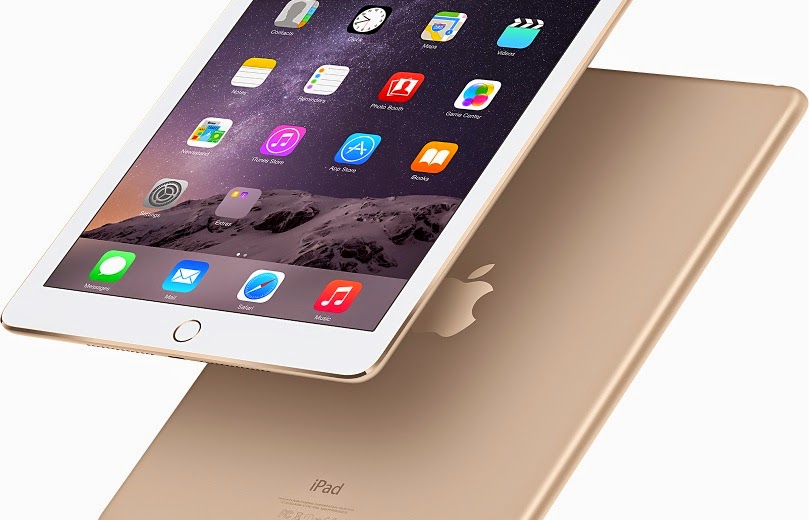
Though iPad Air’s first version was also the head turner but the latest iPad Air 2 has actually stirred the tab market. Apple iPad 2 will surely satisfy all those who were anxiously waiting for its launched by keeping their hopes high. If you own a two to three year old iPad then this iPad Air 2 will definitely look extremely modified to you. From weight to storage to overall performance iPad Air 2 is simply amazing in every sense. 

Design

Measuring just 6.1 mm it is one of the thinnest tablets you can find. Despite being exceptionally slim and light it is strong in built and easy to hold. Being ultra-light it just weighs 437g which means no more wrist aches after holding tablet for long time. It may not be world’s slimmest and thinnest tablet but it definitely gives you best performance in this size as compared to other tablets. With modern feel and premium design it easily justifies its expensive price tag. The overall design resembles a lot to iPad Air that you may find difficult to differentiate between both the models.

iPad Air 2 does not come with the silencing switch, the switch has been omitted to reduce the size however Apple argues that this function can be easily performed in OS just by the flick of hand. But if you are one of those who like to handle the sound without even looking at the screen you’ll definitely going to miss this button. Another major change is the touch idea on home key and the speaker grill has also changed its position now it’s at the bottom with single line of holes.

Display

iPad Air 2 shares identical display as of iPad Air. It is also featured with a 9.7inch screen across the diagonal with Retina resolution of 1,536 x 2,048 and pixel density of 264ppi. It is excellent in colour accuracy with average Delta E of 1.82, and the screen is capable of covering 93.3% of the sRGB gamut. The fully laminated LCD also makes pictures and images look more real and life like.

Touch ID

Tocuh ID and Apple Pay are the noteworthy improvements in the latest version. With Apple Touch ID your tablet remains secure more than ever. When this feature is widely implemented it will also enable you to pay on the move without using your credit card. It is further rumored that Apple will also make it applicable for apps. Imagine how cool it will be if your mail checking app or other such apps will be opened after confirming the identity.

Camera

Bringing iPad on every special event for taking pictures has become a common trend. To keep up with this trend Apple has equipped iPad Air 2 with 8MP iSight camera. Featuring A8X chip iPad Air 2 can now also take slow motion videos like iPhone 6. With the ability of wider panorama and time lapse it is better than cameras of all other competing tabs.

Performance

Ipad Air 2 comes with plenty of dramatic improvements. The RAM has advanced from 1GB to 2GB and the A8X processor is new too. This speedy processor runs at 1.5GHz which is 40% faster than A7. A better quad-core GPU offers 2.5x improvement in graphical performance. In addition 4G speed is also faster now with 150Mbits/sec for downloads.

Battery

Battery is one of the most important component of any competing device may it be laptop, tablet or even smartphone.  Apple has put in great efforts to improve the design of iPad Air but they have not done much in the battery sector. The battery is not extraordinarily good but it is not bad as well. In a video playback test it gives12hrs 46mins which is 9 minutes less than its predecessor.

Friday, 3 April 2015

5 Hidden Features of FireFox

FireFox is among some of the most used browsers of the world. Being widely used browser it definitely has some functions and utilities which attracts more and more people towards it. If you are also using FireFox on your PC and trying to know more features of it so here we are telling you some hidden features of FireFox that will let you work like a pro.

·       Search With Keywords

Keywords let you search easily in a much better way. If you use some particular sites every time you search then it is better to set a keyword for them. For example, by setting the keyword for a Wikipedia page, you’ll be able to directly open that page by writing that keyword in the main address bar. Just right click on the site you want to add a keyword to, a pull down menu will appear then click "Add a Keyword for this Search". Create a keyword in the book mark window, you cannot set multi word keyword so set a keyword without any spaces between the words.  

·       Search Assistance

If you have huge amount of bookmarks and browsing histories and find it difficult to find the thing you’re actually looking for then this feature is especially for you. This feature have some modifiers that refine your searching. Use “^” for matches in your browsing history, “*” for bookmarks, “+”for tagged pages, “@” for URLs and “%” for searching from currently open tabs.

·       Auto Complete

An amazing time saving trick for those who use Mozilla FireFox. It automatically fills the URL without asking you to write suffix or prefix like “www” or “.com”. All you have to do is type website’s name and then press Ctrl + Enter for completing the URL, it is for those websites which end with .com. And for those which end with .org you have to press Control + Shift + Enter.

·       Share easily

Whenever we see a nice video or a funny picture we feel like sharing it with our friends. With Mozilla FireFox sharing is made easier due to this user friendly feature which lets you share things across multiple social media websites. Click on the little paper plane icon shown at left corner, it allows you to share content to multiple logged in accounts including Gmail, Twitter, Facebook and many more.
  

·       Firefox Hello

It is a comparatively newer feature introduced by Firefox. FireFox Hello is a way to start your own chartroom. Just click on the smiley face on top right corner and chat with your friends, even with those who don’t have FireFox. If you are familiar with Google Hangouts then you might find it easy to use.

Monday, 30 March 2015

How to Install Projector in a Room

So you are tired of going to your friend’s place every time you want to enjoy new movie on a projector? So why not buy a projector of your own? You don’t have to save for months to buy a projector, getting an affordable projector is quite easy these days. Once you buy a projector the next big thing is to install it. If the installation is not done properly and it is not fixed at perfect angle, you may not be able to enjoy movies at their best. These are few simple steps you have to follow so you can successfully install the projector.

·       Screen Size

The place to mount your projector depends on the screen size. The screen size or screen width is measured in inches. For making this procedure simple and easy to understand let’s assume you have screen size of hundred inches that will be 115-inches diagonal and 56-inches.

·       Throw Distance

Throw distance is actually the distance between the screen and projector’s lens. Most of the recent projectors come with install-friendly throw distance which allow you to install it in variety of room types and sizes. Just for explaining let’s assume we have a JVC projector which mostly comes with 1.4 to 2.8 throw distance range. So for a hundred inched screen projector can be placed from 140-inches to 280-inches from the screen.

·       Projector Location

Modern projectors are exceptionally silent but still there is fan noise which can prove as constant disruption. So it is better to keep projector back form the seating position. If the projector is in front of your seat you will definitely get distracted by its presence. Anyhow, if you plan to watch 3D movies on it make sure the distance is short because shorter distance means more brightness.

·       Ceiling Mount

Projectors can either be placed on a shelf or table or can be mounted on the ceiling. If you are placing it on a shelf then it can easily sit there on its small feet but if you are planning to mount it to ceiling, it will be mounted upside down. Never buy a mount of substandard quality because you’ll never want your projector to fall directly from the ceiling to the floor. Some good mount manufacturers are adjustable and can be fixed with array of projectors.
  
·       Leveling The Image

After successfully installing the projector now come to leveling of the picture. Keep the front paralleled to the screen so it produce a square and straight image. If the picture is not straight and levelled then slightly move the mount till the picture is perfect. If the screen is still not perfectly filled then gently tilt the mount up and down and read the manual if there is vertically moving option then try to move it vertically for filling the screen.

Here, you are finally done with the installation of your projector and all set to enjoy your favourite movie with friends and a big bowl of pop corns.

Friday, 27 March 2015

Smartphones That Provide Exceptional Security against Hacking

Business does not stay within the walls of your office anymore, now it requires your attention and time even when you are on the move. For staying in touch with your mails and important documents you need to keep sensitive business data in your smartphones. Where smartphone provides you convenience it also poses severe threats to your identity and data.
Where smartphone manufacturers are bringing improvements in security features, hackers are also becoming more professional and efficient. Hackers are using most advanced technologies to steal data from digital devices. Data stored in smartphones is most vulnerable to hacking as compared to laptops and tablets. In these circumstances, for protecting your sensitive data, you need to get a smartphone which offers you exceptional security features. Here we are giving you a list of those smartphones which offer you best security against all threats.

·       iPhone 6

iOS is best known for its security features that is why most professionals prefer iPhones over other brand’s phones having different OS including Android and Windows. It would not be wrong to say that advanced security features are first introduced by Apple and later other copied by other manufacturers in their smartphones. iPhone 6 with all other unbeatable features also has unbeatable security system. With its strong encryption methods and prevention of unauthorized access it gives solid protection to your corporate data and prevents it from getting hacked. It also gives you enhanced protection from malware and virus attacks. With the option of app code signing it further ensures that apps you are installing come from approved sources.

·       Samsung Galaxy S5

Samsung Galaxy 4 was able to stir mobile market with its extraordinary security features but S5 was even better in security than its predecessor. It has all those security features of S4 that amazed people plus it also features a fingerprint scanner. Scanner is present in the Home key of this phone which can be used for locking or unlocking your mobile. Apart from this other security features like KNOX and face detection provides added security to your critical data. KNOX is security suite that secures your important data and files and is complied with U.S. Department of Defense (DOD) mobile OS guide for security requirements (SRG).


·       BlackBerry Z10

Having sophisticated built in security features, it is one of the best phones when you want protection for your sensitive business data. Its top notch feature, BlackBerry Balance gives you maximum security against hacking. It prevents data leakage plus makes it impossible for unauthorized devices to access your business related information. The best thing is it is fully compliant with government standards and regulated environments. BlackBerry Z10 separates your business data from your personal information so there are no chances of pasting content from a work email into a personal account. It is the best option for all those who want to use single smartphone for their personal and business use.

·       Black Phone

If you are looking for a smartphone which offers you best security but may lack in other entertaining features then Blackphone might be a good option for you. With increasing amount of data theft and hacking, maintaining your security can be overwhelming. But Blackphone is a smartphone which is designed to take care of your security issues. For providing you ultra-secure smartphone experience, every black phone has Android based PrivatOS. It is a perfect combination of fortified Android operating system with a suite of security apps to keep your corporate information private.